17+ real providers
CRM, email, commerce, finance, storage, scheduling, and messaging integrations already implemented.FullStak Integrations
Connect. Automate.
Do More.
Integrate with the tools you already use. Eliminate silos, streamline workflows, and keep everything connected in FullStak.
2,500+ integrations availableSave timeMore productivity
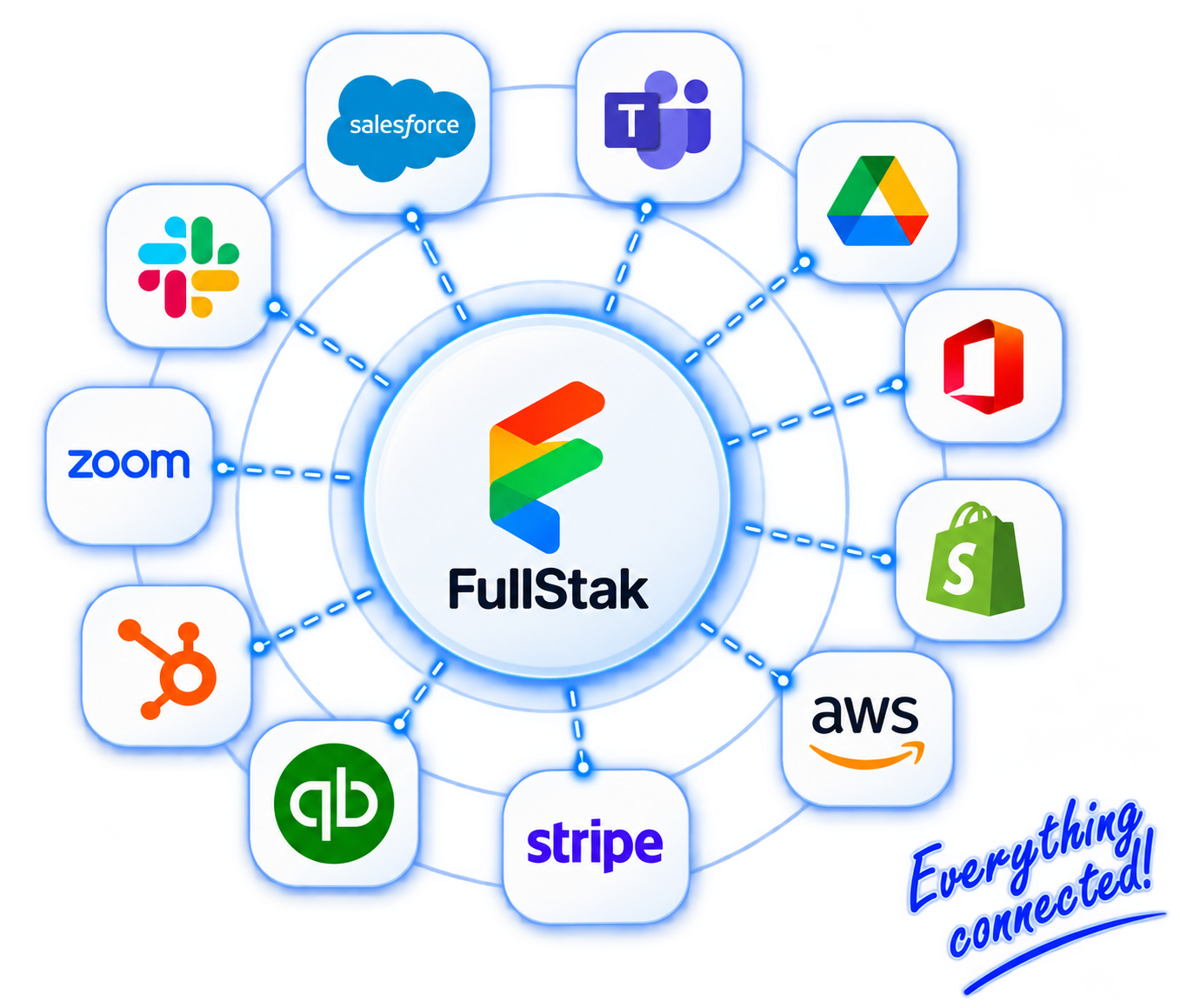
Connect once
Tenant-scoped auth is connected once, then reused across workflows and teams.Execute real work
Create records, send messages, move files, and trigger follow-through in real time.Consistent output for AI + workflows
Workflows, operators, and AI can act on consistent output inside FullStak.Why old integration stacks fail
Disconnected tools still leave the work disconnected
Most integration layers move data around but never become the place where teams actually operate. FullStak uses integrations as an adoption bridge, then brings execution into one system over time.
Data stays split across tools
Every system keeps its own shape of the customer, order, invoice, or task, so teams still reconstruct the story by hand.
Automation stays isolated
One connection solves one step, but the full workflow still breaks across email threads, spreadsheets, and tabs.
AI lacks business context
Answers stay shallow when the model only sees one system instead of the broader customer and operational picture.
Work still happens somewhere else
Operators keep jumping back into CRM, finance, commerce, and storage tools because that is still where the work lives.
Adoption bridge, not permanent glue.
Connect what already matters, keep it updated, and let FullStak become the system where the workflow, approvals, AI, and daily execution actually run.
Popular Integrations
FinancePopular
QuickBooks
Bring billing state, invoice context, and finance follow-through into shared workflows.
Connect
CRMPopular
Salesforce
Keep account, contact, and deal context tied to calls, approvals, and customer execution.
Connect
CommunicationCommon use
Slack
Send alerts, approvals, and routing updates without moving the actual work out of FullStak.
Connect
CRM
HubSpot
Sync contacts, deals, and marketing data.
Connect
Workspace
Microsoft 365
Email, calendar, files, and more.
Connect
Workspace
Google Workspace
Drive, Gmail, Calendar, and more.
Connect
Meetings
Zoom
Meetings, recordings, and webinars.
Connect
Payments
Stripe
Use payment and revenue events in approvals, reporting, and next-step workflows.
Connect
Commerce
Shopify
Pull store, order, and customer context into service, fulfillment, and finance workflows.
Connect
Marketing
Mailchimp
Sync audiences and campaigns.
Connect
Communication
Twilio
SMS, voice, and messaging.
Connect
Storage
Dropbox
Sync and manage files securely.
ConnectHow integrations work
Connect once. Run your business everywhere.
FullStak did not just build connectors. It built a shared connection model that can be reused across workflow runtime, AI, approvals, and operator execution.
01
Connect once
Create a shared connection for the provider with OAuth or API-key credentials scoped to the tenant.
02
Reuse everywhere
Use the same connection across workflows, approvals, AI prompts, and operator surfaces instead of reconfiguring every flow.
03
Run bounded actions
Execute clear business actions like updating records, sending messages, creating orders, or storing files.
04
Return normalized output
Results come back in a consistent shape so FullStak can show readable activity and trigger the next step cleanly.
By category
Real provider coverage across the stack you already have
Each category is there to keep real work moving inside one operating system.
Communication
Keep messages and inbox actions tied to customer and workflow context.
Finance
Keep finance aligned with live customer and operational activity.
CRM & Work
Keep account context, issues, and work aligned inside one operating layer.
Storage & Data
Keep files, spreadsheets, and storage outputs on the same record trail.
Commerce
Use store, catalog, customer, and order actions inside live workflows.
Content & Workspace
Bring workspace knowledge into approvals, execution, and AI context.
Scheduling
Keep availability and timing connected to operational follow-through.
Social
Connect external engagement to the same approval and response workflows.
One connection, unlimited workflows
What changes when the connection model is shared
A single provider connection can support approvals, notifications, record updates, finance actions, file handling, and cross-system follow-through without duplicate setup.
What happens today
Every workflow rebuilds the integration story
Every team configures its own connector and retries the same setup work.
CRM, finance, commerce, and messaging context stay split across tools.
Operators still jump across tabs to finish one workflow.
AI and reporting only see fragments of the real business story.
What happens in FullStak
The connection becomes part of one operating layer
One shared connection model powers the workflow from end to end.
Customer, finance, commerce, and document context stay reusable inside FullStak.
Operators execute from one place while external systems stay current.
AI, workflows, and approvals act on the same output and execution history.
Run your business from one place
Use integrations to execute cross-system work inside FullStak
The goal is not another sync gallery. The goal is to let customer, finance, commerce, messaging, and document actions run from one shared system of action.
Update CRM after every interaction
Push account changes, follow-up, and routing updates from the same customer workflow.
Create orders from workflows
Use Shopify or WooCommerce actions inside service, fulfillment, and operational execution.
Generate invoices from real activity
Bring QuickBooks and Stripe into approvals, billing operations, and revenue follow-through.
Store outputs automatically
Save documents, spreadsheets, and file outputs without breaking the record trail.
Connected system
Integrations get stronger because they run inside the Business OS
Connections are useful because they feed the same CRM, communications, operations, accounting, AI, and document surfaces where your team is already working.
CRM
Bring external account data in while calls, next steps, approvals, and follow-through live on the shared timeline.
CallFlow
Let conversations trigger messages, CRM updates, documents, and operational handoffs on the same system.
Operations
Use commerce, storage, and workflow integrations to support fulfillment, field work, shipping, and readiness.
Accounting
Bring billing context, payments, and finance approvals closer to the actual work that created them.
AI
Give AI real business context from email, CRM, commerce, finance, and documents instead of one isolated app.
Documents
Turn integrations into usable records, stored files, and generated artifacts tied to the business story.
Designed for simplicity at scale
Built for clean execution, not connector sprawl
FullStak is not trying to recreate every external product. It focuses on clear business actions, predictable workflow behavior, visible connection health, and readable results.
Bounded actions
FullStak focuses on the business actions teams actually need, not recreating every admin screen from every external app.
Readable results
Connection health, tests, executions, and returned values stay understandable for operators, not just developers.
Visible connection health
Connections can be validated, tested, and reviewed without guessing which workflow or provider is failing.
Consistent behavior
Teams use one runtime, one workflow surface, and one execution history instead of provider-specific quirks everywhere.
Why FullStak Integrations
One execution layer instead of brittle connector sprawl
The difference is not just coverage. It is whether integrations leave the work scattered across tools or help move it into one operating system.
What actually changes
Legacy stack vs FullStak
Legacy stack
APIs glued together one workflow at a time.
Duplicated customer, order, and billing records.
Automation trapped in isolated tools.
AI limited to one app at a time.
Operators still working across disconnected tabs.
Reporting rebuilt from exports and notes.
FullStak
Shared context across CRM, email, commerce, finance, storage, and messaging.
Real-time actions executed from one workflow layer.
Reusable tenant-scoped connections across teams.
Readable results that feed operators, workflows, and AI.
Legacy tools kept current while work moves into FullStak.
A system of action that gets stronger as more of the business connects.
Move the work
Start with the tools you already use. Move the work into FullStak.
Start with what you already use. Run everything from one place.
This is where your systems become one system.
Connect once, keep legacy systems current, and move execution into FullStak over time.